How to Optimize Your Site Before Converting to WordPress
Pre-conversion checklist for AI builders and static exports — navigation, DOM, forms, and images before you upload to WPConvert.
WPConvert turns exported HTML, CSS, and JavaScript (including Vite and React projects) into a real installable WordPress theme. The quality of that theme depends heavily on what is actually present in the markup when we analyze your site.
If important UI is created only at runtime—hidden behind JavaScript-only navigation, unmounted tab panels, or default opacity-0 states—it may never make it into the converted theme. The good news: most issues are preventable with a short pre-conversion pass in your builder or codebase.
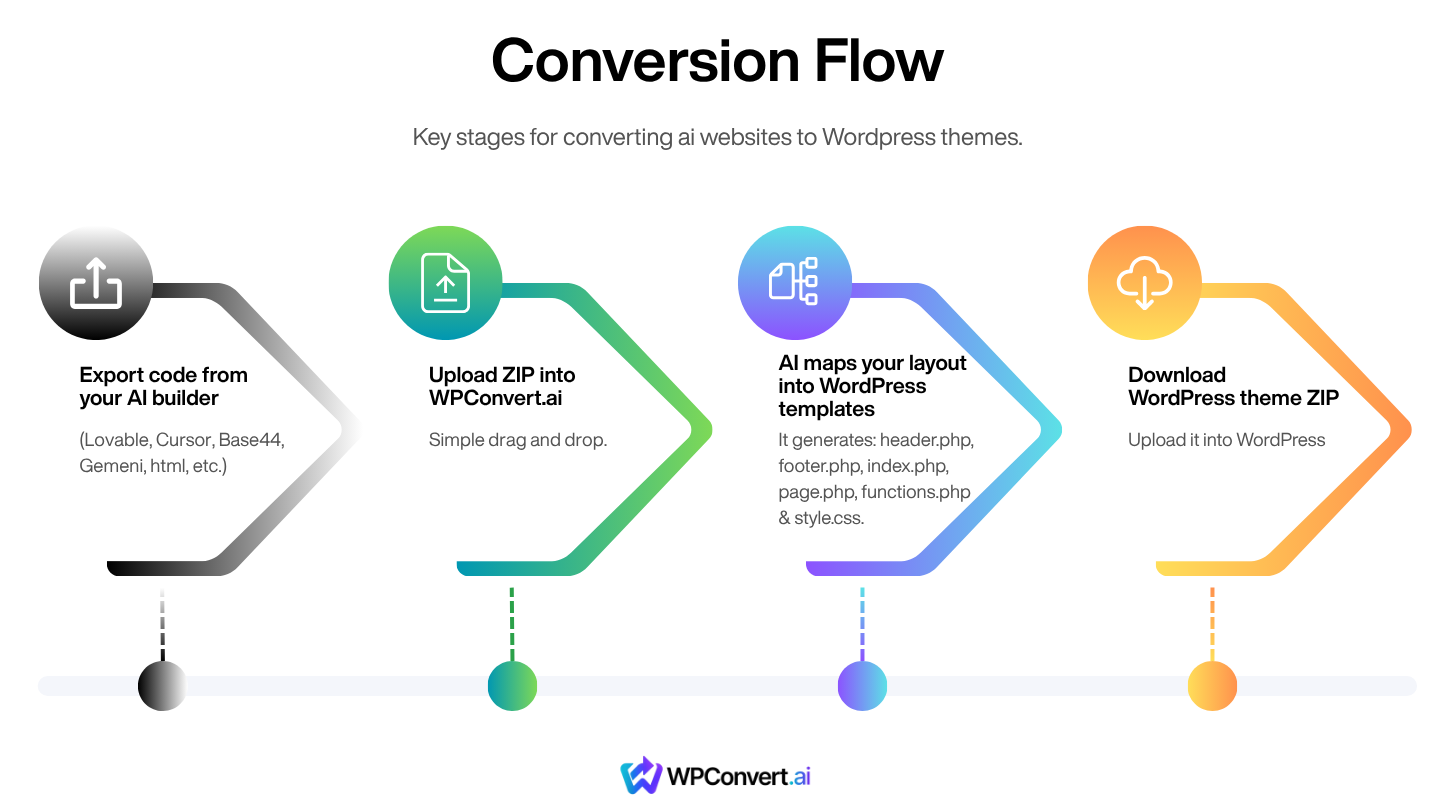
This article mirrors what we document in our Guides hub under Before You Convert, written as a blog-style walkthrough. For the full copy-paste prompt you can drop into Lovable, Bolt, v0, Cursor, Replit, or similar, use that section on the guide page—it is the same source of truth we maintain for edge-case coverage.
Why “Pre-Conversion” Matters
AI builders and SPAs often prioritize interactivity: client-side routing, conditional rendering, and scroll-driven animations. WordPress themes need stable HTML—headers, footers, sections, links, and forms that exist in the document and remain meaningful without relying on a specific hydration order.
Optimizing before you zip and upload means:
- Fewer missing sections (tabs, FAQs, carousels, dropdowns)
- Working phone and email CTAs instead of dead internal routes
- Readable content on first paint, even if animation scripts fail
- Forms that map cleanly to WordPress form plugins later
You are not “dumbing down” your site; you are making the export honest about what the page contains.
Navigation: Prefer Real Links Over JavaScript Handlers
Every destination should appear as a normal link in the HTML.
- Use
<a href="/about">or React Router<Link to="/about">for in-site navigation. Avoid<button onClick={() => navigate(...)}>for primary nav—those destinations often do not survive as crawlable links. - Every navbar item should point to a route that actually exists with a real page component. Placeholder links become broken snapshots.
- Wrap the logo in
<a href="/">or<Link to="/">, not a clickablediv. - Use
<a href="tel:+1234567890">and<a href="mailto:you@example.com">for phone and email—not buttons that simulate navigation. - Dropdowns: child links should stay in the DOM when the menu is closed (hidden with CSS such as
hiddenoropacity-0 pointer-events-none). If you only render items when{isOpen && ...}, closed-state exports may omit entire menus. - Social icons: use
<a href="https://...">around the icon, notbutton+onClick.
Content Structure: One Page, One Honest Document
Semantic structure helps both accessibility and conversion.
- Use one
<header>, one<main>, and one<footer>per page where possible. - Give major sections stable
idvalues that match in-page anchors (for single-page layouts). - Avoid the same slug as both a homepage section
idand a separate route unless/that-routetruly has its own page—otherwise routing and anchors can collide in confusing ways. - Tabs: render all tab panels in the DOM and hide inactive ones with CSS. Avoid
{activeTab === "x" && <Panel />}—unmounted panels may not appear in the theme at all. - FAQs: keep answers in the DOM when collapsed (e.g. Radix Accordion that stays mounted, or CSS height/overflow patterns). Pure conditional rendering can export “questions only.”
- Carousels / sliders: include all slides in the markup; use overflow and transforms for motion instead of mounting only
items[currentIndex]. - Modals and sheets: default to closed so a full-screen overlay does not block the entire snapshot.
Animations: Visible First, Fancy Second
Scroll animations are fine as progressive enhancement—not as the only way content becomes visible.
- Do not use
opacity-0,translate-y-8, or similar as the default state for whole sections. If JavaScript never runs, that content can stay invisible forever. - For Framer Motion, avoid
initial={{ opacity: 0 }}on body copy blocks; preferinitial={false}or patterns where the static state is already readable. - Avoid skeleton-only above-the-fold content where real text and images should be.
Forms: Real <form> Tags and Named Fields
WordPress form plugins expect predictable markup.
- Wrap fields in a real
<form>. - Add a
nameattribute on every input. - Pair
<label htmlFor="...">with matchingidon controls. - Use
type="submit"on the submit control inside the form. - Do not wrap the entire page in a single
<form>—only actual form fields belong there.
Images and Fonts
- Prefer
<img src="..." alt="...">for important imagery with meaningful alt text. - Use real
srcvalues for lazy loading (loading="lazy"), not patterns that require JS to swapdata-srcintosrcfor critical images. - Hero imagery should be discoverable from static assets (for example under
public/or bundled assets) with standard extensions. - Prefer Google Fonts via
<link>/@import, or system stacks; custom font files should live underpublic/when possible.
Build Features WordPress Handles Better
Defer these to WordPress plugins or native features after conversion:
- Multilingual toggles — use one language in the export; add Polylang, WPML, or similar in WordPress.
- Live chat widgets (Intercom, Drift, Tawk.to, etc.).
- Cart, checkout, and payments in client-side JS — plan for WooCommerce or another commerce stack.
- Auth and account systems — WordPress covers membership patterns with plugins.
- Heavy client-side search over APIs — prefer static lists for the export, or plan SearchWP / FacetWP / native search in WP.
Project Settings That Trip Exports
- Keep Vite
baseas/unless you truly deploy to a subdirectory—and then match that consistently. - With React Router, avoid unexpected
basenamevalues unless they match production. - Remove stale standalone HTML files from
public/that could conflict with SPA routes.
Quick Pre-Flight Checklist
Before you upload your ZIP to WPConvert.ai:
Navigation
- Nav uses
<a href>/<Link to>, not buttons withnavigate() - Each nav target has a real page (or intentional hash anchors on one page)
- Logo links home with a real
<a>/<Link> - Phone and email use
tel:/mailto: - Dropdown and social links exist in the DOM when visually “closed”
Content
- Tab panels, FAQ answers, and carousel items are in the markup (hidden with CSS if needed)
- Modals default closed
- Sections have clear
ids where anchors are used
Visibility
- No whole sections stuck at
opacity-0or off-screen translations by default - Main content is readable with JavaScript disabled or delayed
Forms & media
- Proper
<form>, labels,nameattributes,type="submit" - Important images use real
srcandalt
Tooling
-
base: "/"(unless subdirectory deployment is intentional and consistent) - No conflicting stray files in
public/
Next Step: Convert
When the checklist looks good, export your project, upload it to WPConvert.ai, and generate your theme. If you want the exact prompt text and accordion UI we ship in-product, open the Guides hub and scroll to Before You Convert.
Pair this pass with SEO for converted themes so titles, headings, and links survive conversion in a crawlable form.
Common mistakes before conversion
Teams often skip the pre-flight pass because the site “looks fine” in the browser. These patterns cause incomplete themes:
- Button-based primary navigation —
onClickhandlers do not become WordPress menu links. Crawlers and the conversion analyzer both miss destinations. - Conditional tab and FAQ panels —
{isActive && <Panel />}exports empty shells. Users see questions without answers in the theme. - Opacity-zero hero sections — Framer Motion or Tailwind defaults hide entire blocks until scroll. Static HTML snapshots stay blank.
- Phone and email as styled buttons — without
tel:andmailto:hrefs, CTAs break when internal routing is stripped. - Lazy images with JS-only
data-src— hero and logo images may not resolve in the theme asset pipeline. - Multilingual toggles in the export — doubles routes and confuses slug mapping. Ship one language; add WPML or Polylang after hosting on WordPress.
- Uploading without a production build — dev-only paths and HMR artifacts pollute the ZIP. Run
npm run build(or your builder’s export) first.
Pre-conversion launch checklist
Use this immediately before you zip and upload to WPConvert:
Repository and build
- Production build completes with no errors
-
base/basenamematches how you will deploy (/unless subdirectory hosting is intentional) - No stray HTML in
public/that conflicts with SPA routes - Environment-specific API keys removed from client bundles where possible
Markup audit (spot-check 3 pages: home, inner page, contact)
- Nav, logo, footer links use real
hrefvalues - All tab panels, FAQ answers, and carousel slides exist in HTML (hidden with CSS if needed)
- One H1 per page; sections use semantic landmarks (
header,main,footer) - Forms use
<form>, named inputs, labels, andtype="submit" - Critical images use
<img src="..." alt="...">with meaningful alt text
Smoke test
- Disable JavaScript in browser (or throttle network) — main copy and CTAs remain readable
- Click every nav item — each resolves to real content, not a blank or 404 in the export
- Mobile layout checked; modals and sheets default closed
Handoff
- List of routes you expect in WordPress (for redirect planning later)
- Note any sections you intentionally left as plugin placeholders (chat, cart, auth)
Real-world examples
Lovable / Bolt SPA with Radix tabs — A pricing page rendered only the active tier because panels unmounted. Fix: render all three panels, toggle hidden or data-state with CSS. Re-export; conversion captured full comparison tables.
Cursor / Vite marketing site — Navbar used button + useNavigate for About and Contact. Fix: replace with React Router <Link to="/about">. Logo wrapped in <Link to="/">. Phone CTA changed to <a href="tel:+15551234567">. Theme menus and CTAs worked on first convert.
Framer export with scroll reveals — Hero headline used initial={{ opacity: 0 }} on every section. Fix: set initial={false} on body copy or remove motion from above-the-fold blocks. Static export showed full hero text in the WordPress theme.
Static HTML business site — Contact form was a div with inputs and a click handler. Fix: wrap in <form method="post">, add name on fields, use <button type="submit">. WPConvert mapped the form to WordPress-native submission.
Google AI Studio landing page — Carousel mounted one slide at a time. Fix: output all slides in a horizontal track; animate with CSS transform. All testimonials appeared in the converted template.
Browse builders for platform-specific export quirks when your stack differs from these patterns.
Troubleshooting
| Symptom | Likely cause | Fix |
|---|---|---|
| Missing nav items in theme | Dropdown or mobile menu only renders when open |
Keep child links in DOM; hide with CSS |
| Blank hero or sections | Default opacity-0 / off-screen transforms |
Make static state visible; animate as enhancement |
| Dead phone/email buttons | Buttons instead of tel: / mailto: links |
Replace with anchor tags |
| FAQ shows questions only | Accordion unmounts collapsed content | Keep answers mounted; collapse with height/overflow |
| Fewer pages than expected | Client-side routes without static HTML fallbacks | Add prerender routes or export static HTML per path |
| Broken images in theme | External URLs or JS-swapped src |
Use bundled assets under public/ with real src |
| Forms submit nowhere | No <form> or missing name attributes |
Add proper form markup before reconvert |
| Conversion warnings about assets | Wrong base path or missing build output |
Rebuild with base: "/"; upload dist/build folder per docs |
When in doubt, view page source (not DevTools Elements after hydration) — if content is not there, WPConvert cannot invent it.