Introducing the WPConvert Edit Plugin
Make AI-converted WordPress themes fully editable without breaking the layout. The WPConvert Edit Plugin preserves your original structure and adds safe, native editing on top — no Elementor widget mapping, no HTML widget fallback.
Make AI-Converted WordPress Themes Fully Editable — Without Breaking the Layout
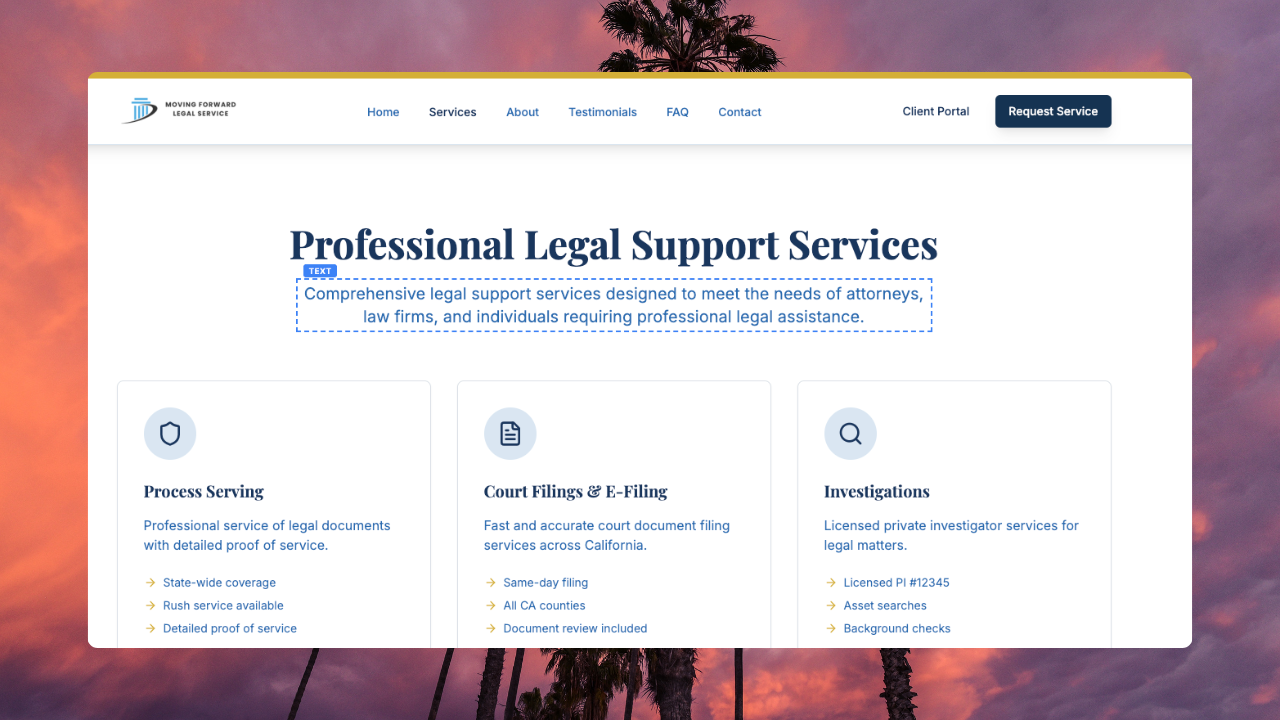
Most AI → WordPress converters either lock your content into static HTML or try to force it into Elementor’s widget tree — which often breaks spacing, nesting, and responsiveness.
WPConvert Edit Plugin does something different.
We preserve your original structure — and add safe, native editing on top of it.
Summary (TL;DR): The WPConvert Edit Plugin is built into every WPConvert theme. It preserves your converted site’s DOM and adds editable regions (headings, text, images, buttons, links, lists, backgrounds, video) so you get an editable AI WordPress theme without rebuilding the layout in Elementor or falling back to HTML widgets. Content is stored in WordPress; layout stays intact.
Why “Editable” AI Conversions Usually Break
A quick recap of the structural problem:
- AI websites use nested HTML + CSS layouts (divs, utility classes, flexbox, grid).
- Elementor uses a section → column → widget tree.
- That structure mismatch causes spacing errors, breakpoints that shift, and unreliable layouts.
- Many converters fall back to HTML widgets — so the design looks right but content isn’t truly editable.
Result: Not truly editable, or editable only at the cost of broken design.
Instead of rebuilding your layout inside a page builder, we preserve it and add editing on top.
What the WPConvert Edit Plugin Does
The plugin is bundled with every WPConvert theme. You don’t install it separately — after conversion, your theme already includes the editor. Log into WordPress as an Administrator or Editor, click “WPConvert Edit” in the admin bar, and start editing.
In edit mode, editable elements show a blue dashed outline when you hover. Click any highlighted region to open the toolbar or popover for that element type.
1. Preserves Original DOM Structure
We do not rebuild your layout inside Elementor. Your nested divs, custom spacing, responsive breakpoints, and CSS architecture stay intact. Layout files remain unchanged; edits are applied at output time so structure is never rewritten.
2. Converts Static Content Into Editable Regions
During conversion, WPConvert detects content regions and marks them as editable. The plugin then lets you:
- Headings — Click any heading (h1–h6) to edit inline; save when done.
- Text & paragraphs — Click any paragraph to edit; same flow as headings.
- Images — Click an image to set a new URL or pick from the WordPress Media Library (and set alt text).
- Buttons — Edit button text and link URL via a popover; changes apply immediately.
- Links (PRO) — Edit existing footer/CTA URLs, or highlight words in a heading or paragraph and turn them into a blue underlined hyperlink (optional “open in new tab”).
- Lists (PRO) — Edit list items inline: add, remove, reorder, rename (e.g. feature lists, pricing bullets, FAQs).
- Backgrounds (PRO) — Change background color or image (URL or Media Library); option to remove background.
- Sections (PRO) — Hide or show entire sections with the eye icon; hidden sections can be restored anytime.
- Video embeds (PRO) — Swap video URLs on HTML5 video and YouTube/Vimeo embeds.
All of this happens without altering the layout. Content is stored in the WordPress database; the theme’s HTML structure is preserved and overrides are applied when the page is rendered.
Turn selected text into a hyperlink (PRO)
Click a heading or paragraph, highlight a word, click Link, paste the URL, optionally check New tab, then click Apply. The words turn blue and underlined. Click Save to keep the change. Apply wraps the selection; Save stores it. Remove unwraps the link without deleting the words.

3. No HTML Widget Fallback
Other tools often dump full sections into a single HTML widget. WPConvert keeps content structured, adds controlled editable regions (marked with data-wpc-id and data-wpc-editable during conversion), and maintains semantic markup. You get real inline editing, not a giant uneditable HTML blob.
4. Layout-Safe Editing
Edits don’t break spacing, collapse padding, destroy mobile layout, or reset breakpoints — because we don’t rebuild structure. We enhance it. The output-buffer system applies your saved content on top of the existing theme output so CSS and layout stay intact.
5. Works With Your Converted Theme
The editor works with standard WordPress theme exports from WPConvert. It doesn’t require Elementor or Gutenberg. It sits on top of your converted theme and runs on the front end: front page, subpages (About, Contact, etc.), and footer. Navigate to any page, turn on edit mode, and click any highlighted element to edit.
How It Works Under the Hood
For developers and agencies who want the technical picture:
- During conversion, WPConvert’s pipeline detects headings, paragraphs, images, buttons, links, lists, video embeds, and sections. It injects editable region attributes (
data-wpc-id,data-wpc-editable) into the theme HTML so each region has a stable ID. - In WordPress, when a page is requested, the theme outputs the normal HTML. The WPConvert Editor (bundled in the theme) runs an output buffer: it captures the HTML, loads saved edits from the WordPress database (
wpconvert_editsoption), and applies overrides via pattern replacement so that saved text, URLs, and visibility replace the original content in the right places. - Layout files stay untouched. No PHP template logic is rewritten for content; the same theme files that were generated at conversion time remain the source of truth for structure. Only the content is overridden at render time.
- Assets and scripts are enqueued cleanly by the theme; the editor’s CSS and JS load only when you’re logged in and in edit mode.
Unlike tools that attempt HTML → Elementor widget tree mapping, we avoid structural translation entirely. We keep your DOM, mark regions once at conversion, and apply edits on top — so you get an editable AI WordPress theme without layout regressions.
Who Should Use the WPConvert Edit Plugin
- Agencies migrating AI-built client sites to WordPress and needing safe, non-technical content updates.
- Freelancers converting static HTML to WordPress who want clients to edit content without touching code.
- Designers using Lovable, Claude Code, Cursor, or similar tools who want a clean WordPress theme that stays editable.
- Developers who want clean WordPress architecture (theme + options-based content) and no layout regressions from page-builder mapping.
- Teams that need to preserve layout when converting to WordPress and avoid “editable but broken” or “pretty but locked” outcomes.
- Agencies and site owners who want content editors (WordPress Editor role) to update copy and images on the front end without theme customization or Appearance access.
Example: AI Site → WordPress → Editable Theme
- Upload your AI-built site (ZIP or export from Lovable, Cursor, Claude, Framer, etc.) to WPConvert.
- WPConvert generates a WordPress theme (PHP templates, CSS, JS, assets). The theme already includes the WPConvert Editor — no extra install.
- Install the theme in WordPress (Appearance → Themes → Upload Theme) and activate it.
- Open your site in the browser while logged in as an Administrator or Editor. Click “WPConvert Edit” in the admin bar to enter edit mode.
- Editable regions show a blue dashed outline when you hover. Click a heading, paragraph, image, or button to edit; use the toolbar or popover to save, cancel, or reset to original. On Pro, highlight a word inside a paragraph, click Link, Apply, then Save to turn it into a blue underlined hyperlink.
- Content updates are saved via AJAX to the WordPress database. Layout and styling stay the same. You can convert AI website to editable WordPress and fix non-editable AI themes by using this workflow instead of forcing the site into Elementor or locking it into static HTML.
WPConvert vs Generic AI → Elementor Mapping
| Feature | Generic mapping tools | WPConvert Edit Plugin |
|---|---|---|
| Rebuilds layout | Yes | No |
| Uses HTML widget fallback | Often | No |
| Preserves breakpoints | Unreliable | Yes |
| Maintains nested structure | No | Yes |
| Safe editing (no layout break) | Partial | Full |
| Requires Elementor | Often | No |
Tone is professional; the comparison is factual, not attacking competitors.
Can You Edit AI-Generated WordPress Themes?
Yes. You can have an editable AI WordPress theme that doesn’t sacrifice layout or rely on Elementor.
- Convert AI website to editable WordPress: Use WPConvert to generate a theme, then use the built-in editor to change headings, text, images, buttons, and (on PRO) links, lists, backgrounds, sections, and video — all from the front end.
- Fix non-editable AI themes: If you already have a WPConvert theme, the editor is already there. Log in, click “WPConvert Edit,” and edit. If your theme came from another converter that left everything static or dumped into HTML widgets, re-converting with WPConvert gives you the same editable-region approach.
- Preserve layout when converting to WordPress: The key is to avoid rebuilding the DOM into a page builder. WPConvert keeps your structure and adds editable regions on top, so spacing, breakpoints, and nesting are preserved.
The WPConvert Edit Plugin is how we make that possible.
FAQ
Can I use this without Elementor?
Yes. The WPConvert Edit Plugin does not require Elementor (or Gutenberg). It works with the standard WordPress theme output that WPConvert generates. You get inline editing on the front end without any page builder.
Does it work with Gutenberg?
The editor works with WPConvert’s theme output. It doesn’t depend on Gutenberg blocks. If your site uses Gutenberg elsewhere, the converted pages are still regular theme templates with the Edit Plugin’s editable regions.
Will editing break my layout?
No. Edits are applied as content overrides at output time. We don’t rewrite your HTML structure or CSS. Spacing, padding, breakpoints, and nesting stay as they were at conversion. That’s the point of layout-safe editing.
Does it modify my theme files?
No. Saved content is stored in the WordPress database (options). The theme’s PHP and HTML structure are not modified. When the page loads, the editor’s output buffer injects your saved text, URLs, and visibility into the right places. Theme files remain unchanged so you can still update the theme or adjust code if needed.
Is it compatible with custom CSS?
Yes. The theme’s CSS (and any custom CSS you add) is unchanged. The editor only replaces content inside marked regions; it doesn’t alter your styles or layout rules.
Can agencies white-label it?
Pro and Agency themes use neutral labels automatically — the admin bar shows Edit Content, the wp-admin menu is Content Editor, and there is no WPConvert branding in normal client workflows. Replace inc/wpconvert-editor.php in your theme with the latest version (v1.3.0+) or re-convert to pick this up. A small "Powered by WPConvert" link remains at the bottom of the wp-admin guide page only.
Starter themes show WPConvert Editor in the admin bar. Future Agency plans may add custom editor names, icons, and support links.
Can I turn a word in a paragraph into a hyperlink?
Yes, on Pro, Agency, and PAYG. Click the paragraph, highlight the words, click Link, paste the URL, optionally check New tab, click Apply, then Save. Linked words appear blue with an underline so visitors can see they are clickable.
Can WordPress Editors use the front-end editor?
Yes. By default, both Administrators and Editors can open the front-end editor on the front end (Edit Content on Pro/Agency, WPConvert Editor on Starter). Editors can change existing content (headings, text, images, buttons, and PRO features where enabled) without access to theme files or Appearance settings. Site administrators can enable or disable other roles under Content Editor or WPConvert → Who can use the front-end editor? in wp-admin.
How do I control which roles can edit?
Log in as an Administrator, open Content Editor (Pro/Agency) or WPConvert (Starter) in the WordPress admin menu, and use the Who can use the front-end editor? checkboxes. Administrator is always enabled; Editor is on by default. Saving updates WordPress capabilities immediately — no theme file edits required.
Should I edit under Pages → Edit in wp-admin?
No. Use the front-end editor: visit your live site while logged in and click Edit Content (Pro/Agency) or WPConvert Editor (Starter) in the admin bar. The block editor and Pages → Edit do not show WPConvert editable regions; saved edits are applied when visitors load the page through your theme templates.
To make that hard to get wrong, converted pages relabel WordPress's own admin bar button to Page Settings — it still opens the normal WordPress screen for the title, URL, template and SEO fields, it just no longer implies that page content lives there. That screen also shows a notice linking straight back to the front-end editor for the page you were viewing. Pages you create yourself in WordPress are untouched and keep the standard Edit Page button, because for those the block editor really is the content editor.
Stop Rebuilding AI Sites Inside Page Builders
Convert once. Edit safely.
With the WPConvert Edit Plugin, you get an editable AI WordPress theme that preserves your design and lets you (or your clients) change content from the front end — without forcing the site into Elementor, without HTML widget fallback, and without breaking the layout.
- Start Converting — Upload your AI-built site and get a WordPress theme with the editor built in.
- See How It Works — Step-by-step guide to editing your theme (Edit My Theme in the dashboard).
Further Reading
- Introducing the WPConvert CPT Plugin — Turn repeating content into Custom Post Types you can manage from wp-admin.
- Introducing the WPConvert Forms Plugin — Wire AI-generated forms to Contact Form 7, WPForms, or Gravity Forms.
- Why AI to Elementor Conversions Break (And How We Fixed It) — Why mapping HTML to Elementor fails and how we preserve structure instead.
- Convert Lovable to WordPress — Turn Lovable.dev exports into WordPress themes.
- Convert Claude-generated site to WordPress — Convert Claude-generated HTML/CSS/JS into installable themes.
- Convert Framer to WordPress — Convert Framer static exports to WordPress.