Introducing the WPConvert Forms Plugin
Make AI-generated forms work in WordPress — securely and reliably. The WPConvert Forms Plugin wires your converted contact forms to Contact Form 7, WPForms, or Gravity Forms so they send email, pass validation, and keep your original design.
Make AI-Generated Forms Work Properly in WordPress — Securely, Reliably, and Natively.
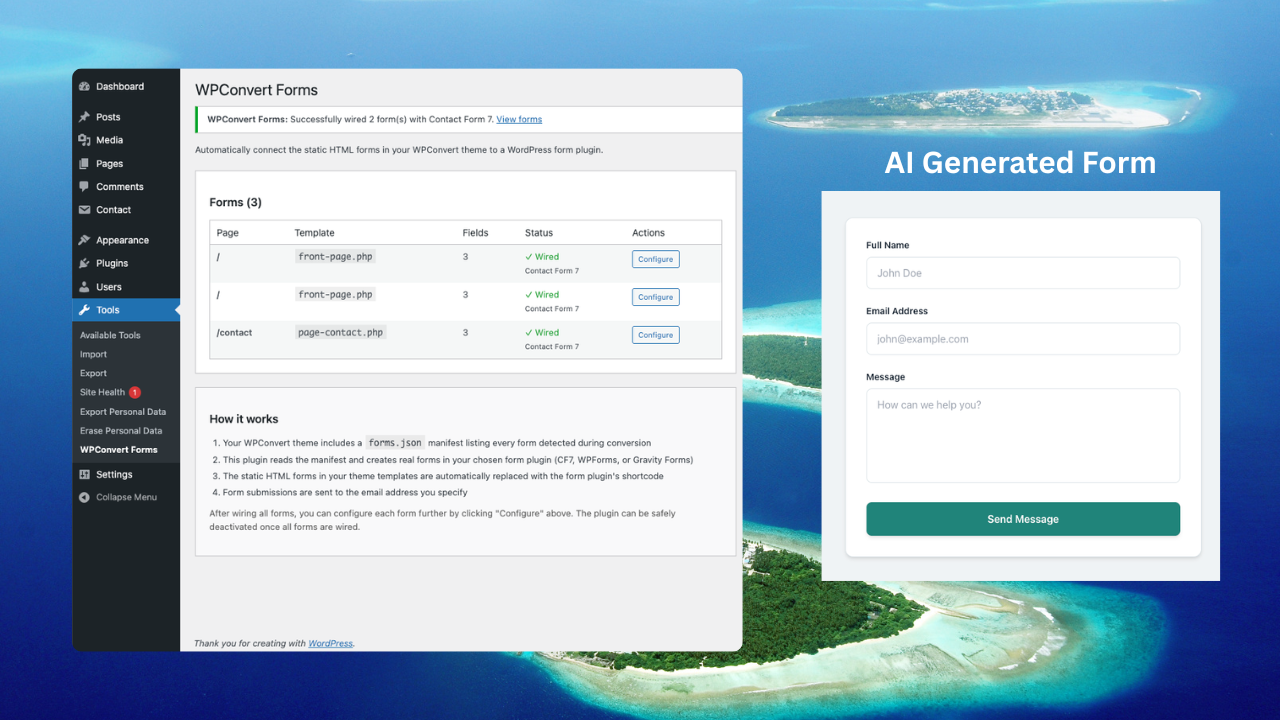
AI website builders generate beautiful forms. But after conversion to WordPress, those forms often:
- Don’t submit — no backend to handle the POST
- Don’t send emails — no connection to mail or SMTP
- Have no server-side validation — no sanitization or nonce checks
- Break on live servers — front-end HTML with nothing behind it
WPConvert Forms Plugin fixes that.
It wires your converted forms to real WordPress form plugins so submissions work — without rebuilding the form manually.
Summary (TL;DR): When WPConvert detects forms during conversion (PRO, Agency, or PAYG), it includes the WPConvert Forms Plugin in your theme download. You install Contact Form 7 (or WPForms / Gravity Forms), activate the plugin, go to Tools → WPConvert Forms, set your recipient email, and click “Wire All Forms.” Your original form design stays; a secure bridge connects it to CF7/WPForms/Gravity so you get fix AI form not submitting in WordPress and convert HTML form to WordPress properly with email, validation, and optional submission logging via your chosen form plugin.
Why AI Forms Break After Conversion
Most AI builders generate front-end-only HTML forms:
- No backend logic
- No WordPress nonce verification
- No sanitization or server-side validation
- No email routing
- No integration with SMTP or form plugins
When that HTML is imported into a WordPress theme:
- The form doesn’t connect to
wp_mail()or any mail pipeline - It fails standard security and validation checks
- It can’t store submissions without custom code
- It doesn’t use WordPress form standards
AI builders design forms visually. WordPress requires backend handling. The WPConvert Forms Plugin adds that handling by wiring your existing form markup to a real form plugin.
What the WPConvert Forms Plugin Actually Does
The plugin is included in your theme download when your conversion detects forms — on PRO, Agency, and PAYG plans. You upload wpconvert-forms.zip from the theme’s plugins/ folder, activate it, then use Tools → WPConvert Forms to connect your forms.
1. Detects Forms During Conversion
When you upload your AI-built site:
- WPConvert identifies all form elements in the converted theme
- Extracts fields (text, email, textarea, select, checkbox, radio, file)
- Captures structure and labels for the manifest
- Maps input types correctly into a
forms.jsonmanifest bundled with the theme
So the plugin knows exactly which forms exist and what fields they have.
2. Wires Forms to WordPress Form Plugins
Instead of leaving raw HTML with no backend, the plugin:
- Creates real forms in Contact Form 7, WPForms, or Gravity Forms (your choice) with the same fields
- Sets recipient email and mail options so submissions go to your inbox
- Injects a secure bridge so the original form on the page submits via the chosen plugin’s API — with proper nonces, validation, and sanitization handled by that plugin
- Preserves your design — the visible form is still your theme’s HTML and CSS; only the submission is handled by CF7/WPForms/Gravity
So you get WordPress nonce form conversion and server-side validation without rebuilding the form visually.
3. Preserves Original Design
The plugin does not replace your form with a shortcode block. It:
- Keeps your layout and markup
- Maintains spacing and breakpoints
- Retains CSS styling and button design
- Uses a hidden instance of the form plugin plus a small JavaScript bridge to submit the data
Functionality is wired. Design is preserved.
4. Enables Email and SMTP Support
Submissions are sent through the form plugin you chose (CF7, WPForms, or Gravity). So you get:
- Default WordPress mail (or the plugin’s mail settings)
- SMTP plugins — any plugin that hooks into WordPress or the form plugin works
- Mail delivery services (SendGrid, Mailgun, etc.) when configured with your form plugin
- Reply-To and proper headers so AI contact form not sending email is resolved
No more silent form failures.
5. Optional Submission Logging and CRM
Depending on the form plugin you use:
- WPForms and Gravity Forms store entries in the database; you can view, export, and integrate with CRM tools
- Contact Form 7 sends email by default; add-ons can add storage
- The plugin sets up the form and recipient; you manage logging and integrations inside the form plugin you chose
That makes the form production-ready and secure AI website forms in WordPress.
How It Works Under the Hood
- During conversion, WPConvert parses the theme’s forms and writes a forms.json manifest (page, template file, field list with types and labels).
- When you “Wire” a form, the plugin reads the manifest, calls the adapter for your chosen plugin (CF7, WPForms, or Gravity), and creates a real form there with the same fields and your recipient email. It then injects a hidden instance of that form plus a bridge script into the theme template. The visible form keeps its original HTML and CSS.
- On submit, the bridge script prevents the default submit, copies the visible form’s data into the hidden form plugin form, and POSTs to the form plugin’s API (e.g. CF7’s REST endpoint). The plugin handles nonce, validation, sanitization, and email; the user sees success or error in your original form’s layout.
- Admin actions (wire form, wire all) use WordPress nonces (
check_admin_referer). No inline JS hacks — the bridge is minimal and uses the form plugin’s own APIs.
Unlike raw HTML form imports, this follows WordPress form architecture: you use a real form plugin for security and delivery; WPConvert Forms only connects your design to it.
Who Should Use the WPConvert Forms Plugin
- Agencies migrating AI-built client sites who need contact or signup forms to work on day one
- Freelancers converting static or AI-generated HTML to WordPress who don’t want to hand-code form handlers
- Developers building lead-generation or contact pages from AI-designed sites
- Businesses that rely on form submissions and can’t afford broken or non-sending forms
- Anyone who wants to fix AI-generated forms in WordPress without rebuilding them
Example: AI Contact Form → WordPress Production Form
- Upload your AI-built site (with a contact form) to WPConvert and convert with a PRO, Agency, or PAYG plan.
- Download the theme ZIP; inside is a
plugins/folder with wpconvert-forms.zip. - Install the theme in WordPress, then go to Plugins → Add New → Upload and install wpconvert-forms.zip. Activate it.
- Install Contact Form 7 (or WPForms / Gravity Forms) if you haven’t already.
- Go to Tools → WPConvert Forms. Set your recipient email and click “Wire All Forms.”
- The plugin creates the corresponding form(s) in CF7 (or your chosen plugin) and wires your theme’s form(s) to them. Test a submission — it should send email and show success/error in your original design.
Your AI contact form is now a secure, working WordPress form with no manual rebuild.
AI Form Conversion: Generic Tools vs WPConvert
| Feature | Generic converter | WPConvert Forms Plugin |
|---|---|---|
| Backend handling | No | Yes (via CF7/WPForms/Gravity) |
| WordPress nonce / security | No | Yes (via form plugin) |
| Server-side validation | No | Yes (via form plugin) |
| Email integration | Manual | Built-in (set email, wire) |
| SMTP / delivery | Manual | Works with your setup |
| Preserves original styling | Often broken | Yes |
| Submission logging | No | Optional (WPForms/Gravity) |
| One-click wiring | No | Yes (“Wire All Forms”) |
Tone is professional and factual.
How to Fix AI-Generated Forms in WordPress
If you’re dealing with fix AI form not submitting in WordPress or AI contact form not sending email, the fix is to give the form a proper backend:
- Convert with WPConvert (PRO, Agency, or PAYG) so the theme includes the Forms Plugin and a
forms.jsonmanifest. - Convert HTML form to WordPress properly by wiring it to Contact Form 7, WPForms, or Gravity Forms via Tools → WPConvert Forms instead of leaving it as static HTML.
- Use WordPress nonce form conversion and validation by letting the form plugin handle submission; the WPConvert Forms Plugin only connects your design to that plugin.
- For secure AI website forms in WordPress, use the plugin’s wiring flow so nonces, sanitization, and mail are handled by the chosen form plugin — no custom PHP form handlers required.
The WPConvert Forms Plugin is built for this: make AI-generated forms work in WordPress without rebuilding them manually.
FAQ
Do I need Elementor for this?
No. The WPConvert Forms Plugin works with any WPConvert theme. It wires your form to Contact Form 7, WPForms, or Gravity Forms. Elementor is not required.
Does it work with Gutenberg?
Yes. The plugin doesn’t depend on Gutenberg or block editors. It works with the theme’s template output. Your form can sit in a classic template or alongside Gutenberg content.
Does it replace Contact Form 7?
No. It uses Contact Form 7 (or WPForms or Gravity Forms). It creates a form inside the plugin you choose and wires your theme’s visible form to submit through that plugin. So you get CF7’s (or WPForms’/Gravity’s) security, validation, and email; your design stays as-is.
Will it modify my theme files?
When you wire a form, the plugin injects a small hidden form and a bridge script into the theme template so the visible form can submit via the form plugin’s API. Theme structure and your form’s HTML/CSS remain; only the wiring markup is added. You can re-wire or change form plugin from Tools → WPConvert Forms.
Does it support custom field types?
It supports the field types that WPConvert detects during conversion and that the target plugin supports: text, email, tel, url, number, date, textarea, select, checkbox, radio, and file. Custom or unsupported types may need manual adjustment in the form plugin after wiring.
Can I integrate with CRM tools?
Submissions are handled by the form plugin you chose (CF7, WPForms, Gravity). WPForms and Gravity Forms offer CRM and automation integrations. Contact Form 7 can be extended with add-ons. The WPConvert Forms Plugin wires your form to one of these; CRM integration is configured inside that plugin.
Don’t Just Convert AI Forms. Make Them Work.
Convert with WPConvert (PRO, Agency, or PAYG), install the Forms Plugin from your theme, and wire your forms to Contact Form 7, WPForms, or Gravity Forms in one click. You get secure AI website forms in WordPress that send email, pass validation, and keep your design.
- Start Converting — Upload your AI-built site and get a theme with the Forms Plugin when forms are detected.
- Learn How WPConvert Works — See conversion and plugin setup in the dashboard and guides.
Further Reading
- Introducing the WPConvert CPT Plugin — Turn repeating content into Custom Post Types you can manage from wp-admin.
- Introducing WPConvert WooCommerce Import — Import AI-detected product catalogs as real WooCommerce products with one click.
- Introducing the WPConvert Edit Plugin — Make converted themes editable without breaking the layout.
- Why AI to Elementor Conversions Break — Why form and layout handling matter when converting AI sites.
- Convert Lovable to WordPress — Turn Lovable.dev exports into WordPress themes.
- Convert Claude-generated site to WordPress — Convert Claude-generated sites into installable themes.